
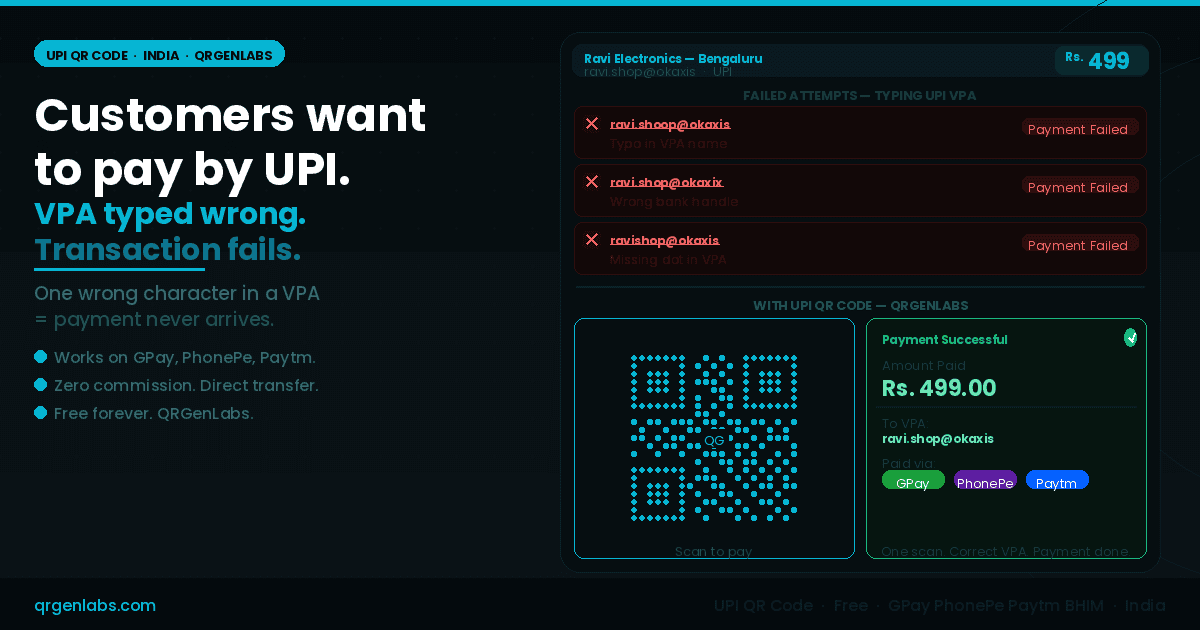
Ravi runs an electronics accessories shop in Bengaluru's SP Road — the city's most famous tech market. He sells cables, adapters, memory cards, and mobile accessories. Most of his customers are young, tech-savvy, and prefer UPI to cash.
He has his UPI ID printed on a small card taped to the counter: ravi.shop@okaxis.
On a busy Saturday, three customers tried to pay by UPI. One typed ravi.shoop@okaxis — an extra letter in the name. One typed ravi.shop@okaxix — the last character of the bank handle was wrong. One typed ravishop@okaxis — missing the dot between name and handle.
All three transactions failed. All three customers spent thirty seconds trying to figure out what went wrong. One handed over cash reluctantly — he had only ₹400 and the bill was ₹499. One left without buying. One asked Ravi to read it out slowly while they typed — holding up the queue behind them.
Ravi's UPI ID was perfectly correct on his card. His UPI account was active. The problem was not with the payment system. The problem was with eleven characters of text that customers were being asked to type accurately under the pressure of a live transaction.
This is the UPI VPA problem that thousands of small business owners, freelancers, and vendors across India face every single day. And it has a fix that takes sixty seconds to implement.
Why UPI VPAs are harder to type correctly than they look
A UPI Virtual Payment Address looks simple from the outside. But from a customer's perspective, standing at a counter, trying to complete a payment quickly, a VPA carries several specific risk points for error.
The bank handle varies and is unfamiliar. @okaxis, @okhdfcbank, @okicici, @ybl, @ibl, @paytm, @waicici — there are dozens of valid handles used by different banks and payment apps. A customer who banks with HDFC and pays via PhonePe may never have typed an @okaxis handle before. They guess, they get it wrong, and the payment fails.
The dot notation is counterintuitive. VPAs like firstname.lastname@bank or shopname.city@bank require a dot separator that people commonly miss or replace with an underscore, a hyphen, or nothing at all.
Numbers and letters at the end of a name look similar under pressure. ravi1 vs ravil. shop0 vs shopo. Under fluorescent market lighting, on a small phone screen, in a transaction moment where the customer wants to complete quickly, these distinctions get missed.
Verification is not instant. Many UPI apps show the payee name only after the transaction is initiated. A customer who has typed the VPA incorrectly may not catch it until after they have attempted the transaction — at which point it has already failed, the session has timed out, or they have to start over.
The result, across India's millions of small merchants, street vendors, freelancers, and service providers who use UPI: a measurable percentage of willing customers who wanted to pay are lost or delayed at the final step of the transaction — not because of any systemic failure, but because a VPA is a fragile string to type.
The scale of the problem across India
India processed over 13 billion UPI transactions in a single month in 2024. The infrastructure is extraordinary. The adoption is near-universal in urban and semi-urban India. GPay, PhonePe, Paytm, BHIM, Amazon Pay, CRED, and the built-in payment apps of virtually every major Indian bank all operate on the same NPCI-standardised protocol.
But the point of failure for small merchants is not the network. It is the moment the customer opens their UPI app, navigates to "Pay by UPI ID", and types the merchant's VPA from a handwritten note, a printed card, or worse — from memory after glancing at it briefly.
In markets like SP Road in Bengaluru, Nehru Place in Delhi, Lamington Road in Mumbai, Ritchie Street in Chennai, and Chandni Chowk in Kolkata — where transactions are fast, queues form quickly, and the pressure to complete the payment in seconds is real — this failure mode repeats throughout the day.
For freelancers in Pune, Hyderabad, and Ahmedabad invoicing clients via WhatsApp. For home-based food businesses in Kochi and Surat taking orders on Instagram. For chai vendors in Patna and auto mechanics in Jaipur who have gone cashless but still lose payments to VPA typos. The problem is the same everywhere the VPA must be typed from a printed surface.
"The UPI network handles the payment flawlessly once the VPA resolves correctly. The entire failure rate sits in the four seconds between the customer opening their UPI app and typing the first character of the merchant's address."
What a UPI QR code solves
A UPI QR code encodes the complete upi://pay deep-link URI — the same standardised protocol defined by NPCI and used by every certified UPI app in India — directly into a scannable QR matrix.
This URI carries the merchant's VPA, the merchant's display name, and optionally a fixed transaction amount. When a customer opens any UPI app — GPay, PhonePe, Paytm, BHIM, Amazon Pay, or their bank's own app — and uses the scan function, the payee VPA is resolved automatically. The payment screen opens with the merchant name confirmed and the amount pre-filled.
The customer verifies the payee name on screen — the same verification step they would use anyway — enters their UPI PIN, and confirms. Payment is complete.
There is no VPA typing. There is no risk of a wrong character. There is no @okaxix instead of @okaxis. The VPA that lands in Ravi's account is exactly the VPA he encoded into the QR — every character, every time, for every customer, regardless of which UPI app they use or which bank they are with.
Three scenarios — one fix
The street vendor
Raju sells fresh juice at a cart near Indiranagar metro station in Bengaluru. His UPI ID is raju.juice@ybl. He writes it on a board with a marker. By noon the ink has smudged. Customers squint at it. Some type it wrong. Some give up and pay cash, but he gets shortchanged on small change constantly.
A laminated UPI QR code taped to the cart — printed in sixty seconds from QRGenLabs, free of charge — ends the VPA problem completely. Customers scan, verify "Raju Juice" on their app, pay ₹60, and move on. The queue flows faster. Revenue is exact. No change required.
The freelance designer
Priya is a UI/UX designer in Pune who invoices clients via WhatsApp. She sends her rate, gets approval, and then asks clients to "please transfer to priya.design@okhdfcbank." Half the time, the client comes back saying "it's saying invalid VPA." She has to re-type it in the chat, they try again, sometimes it works, sometimes the handle is still being misread.
A UPI QR code saved as a PNG in her phone — generated once on QRGenLabs, free — can be shared directly in WhatsApp. The client opens it, scans from their UPI app, and the payment goes through without a single character of her VPA being typed by anyone. She gets paid faster. The client has a smoother experience. The back-and-forth about invalid VPAs disappears.
The restaurant in Hyderabad
Lakshmi Bhavan in Hyderabad's Himayatnagar area uses a printed QR code at the billing counter. The QR was generated through their bank and it works — but it has no amount pre-filled. Every transaction requires the cashier to verbally confirm the amount with the customer. During lunch rush, this adds ten to fifteen seconds per transaction and creates disagreements when the verbal communication is missed.
Ravi regenerates the QR on QRGenLabs with the common thali price (₹180) pre-encoded. Customers on the standard thali scan once, verify ₹180 and the restaurant name, enter their PIN, and pay without any verbal confirmation needed. The lunch queue processes thirty percent faster.
Where to place your UPI QR code for maximum scan rate
On the billing counter. The highest-intent moment. Customer has decided to pay, has their phone ready. A laminated QR code at counter height — A5 or A4 size — is the most efficient placement for any merchant with a physical checkout point.
On the menu or price list. For restaurants, tiffin centres, and food stalls across India, a QR code on the menu means customers can prepare to pay while they are still choosing. By the time the bill arrives, the app is already open.
In WhatsApp status and pinned messages. For freelancers, home businesses, and service providers who communicate with clients via WhatsApp — hairdressers in Chandigarh, tutors in Lucknow, photographers in Bhopal — a UPI QR image in WhatsApp status or sent directly in the chat eliminates VPA friction entirely.
On delivery packaging and inserts. Home-based bakeries, cloud kitchens, and small e-commerce sellers in Mumbai, Delhi, and Bengaluru who do cash-on-delivery can include a UPI QR on the packaging insert — pre-filled with the order amount — for customers who want to pay digitally on delivery.
On printed invoices and receipts. For B2B and service-sector transactions — electricians, plumbers, AC technicians, and contractors across India's tier-2 and tier-3 cities — a UPI QR on the paper invoice eliminates payment delays caused by clients who forget the VPA or type it incorrectly days after the job is done.
Static UPI QR versus amount-encoded UPI QR
QRGenLabs lets you generate both configurations.
A static UPI QR without a fixed amount is the right choice for most merchants. The customer scans, the VPA resolves, and they enter the amount themselves. This works for any business where transaction amounts vary — restaurants, repair shops, freelancers, and general retailers. The VPA typo problem disappears entirely. The amount flexibility remains.
A UPI QR with a fixed amount pre-encoded is ideal for fixed-price transactions — a specific menu item, a standard service fee, a delivery charge, an event ticket price. The customer scans, verifies both the payee name and the amount on their UPI app screen, and pays with a single PIN entry. For tiffin subscriptions, monthly coaching fees, salon appointments, and any business with a standard rate, this format removes both the VPA problem and the amount communication problem simultaneously.
How to create your UPI QR code on QRGenLabs
Creating a UPI QR code on QRGenLabs takes under sixty seconds and requires no account.
- Go to QRGenLabs and select the UPI QR type from the generator
- Enter your UPI Virtual Payment Address (VPA) — for example
yourname@okaxisorshopname@ybl - Enter your display name as you want it to appear on the customer's payment confirmation screen
- Optionally enter a fixed transaction amount if you want it pre-encoded in the QR
- Customise the design — add your shop logo, choose colours, set error correction to High for print use
- Export as PNG for digital use or SVG for print-quality output — laminate and place at your counter, include in WhatsApp, or attach to your invoice template
Static UPI QR codes are free forever on QRGenLabs — no account required, no expiry, no commission on transactions, no watermark to remove before print.
Your VPA is correct. The customer's typing is not.
Ravi's UPI ID — ravi.shop@okaxis — was never wrong. The payment system was never broken. The network was functioning perfectly. The failure was eleven characters being typed by a customer in a hurry under real-world conditions.
A UPI QR code removes the typing entirely. The VPA transfers from your code to the customer's payment screen without a single human transcription step. The customer verifies your name on their screen — the most important verification in any UPI transaction — and pays.
Every business in India that accepts UPI payments and currently shares their VPA verbally, in writing, or on a printed card is running a small but constant revenue leak from VPA errors. A UPI QR code from QRGenLabs closes that leak in sixty seconds, for free.
Create your free UPI QR code at QRGenLabs — no account, no commission, ready to print before your next opening hour.